
Customers increasingly expect businesses to make product discovery as convenient as the conversation itself. When someone asks about a product on WhatsApp, sending individual images, price lists, PDFs, product links, and descriptions creates unnecessary back-and-forth.
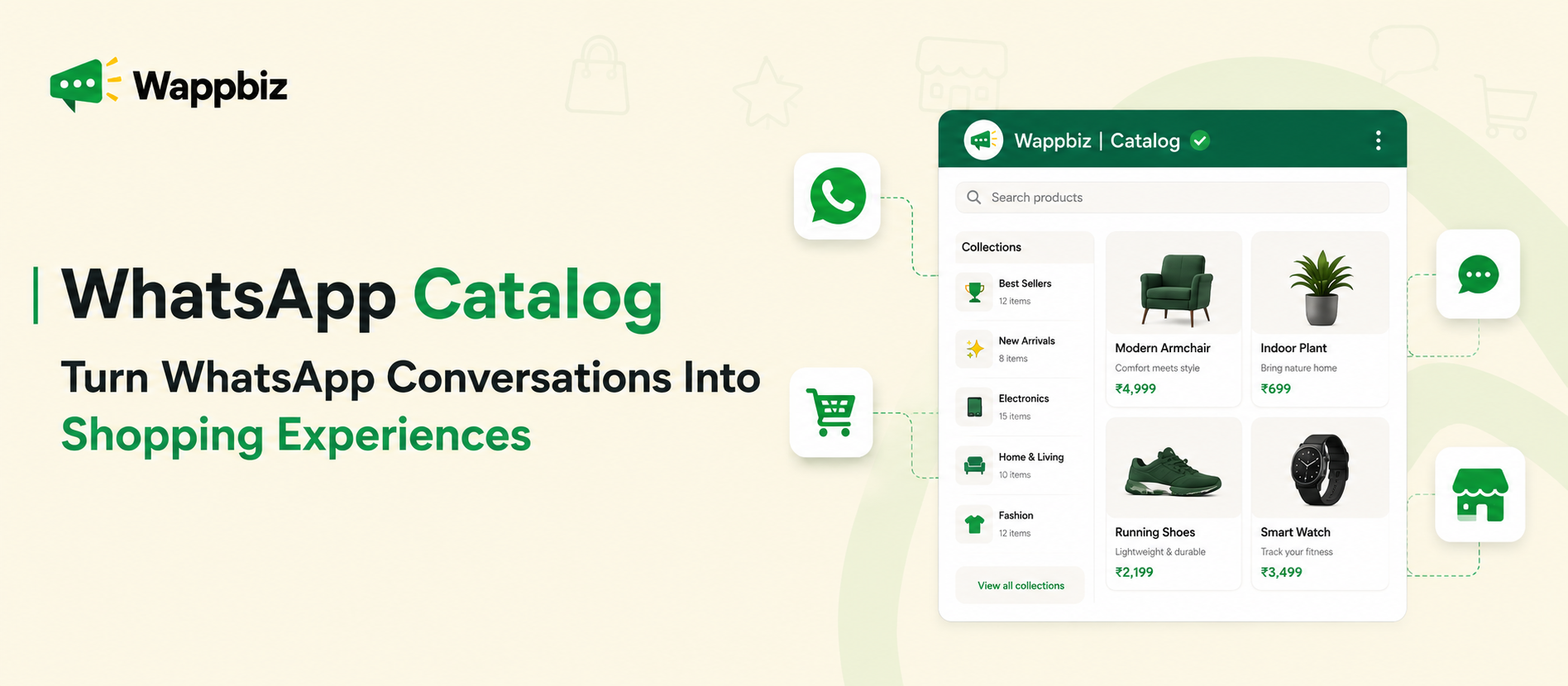
A WhatsApp Catalog gives businesses a structured way to showcase products and services directly through WhatsApp. Customers can browse available offerings, view product information, explore options, enquire about products, and move closer to a purchase without interrupting the conversation.
For retail, ecommerce, D2C, and service businesses, this creates an opportunity to turn WhatsApp from simply a messaging channel into a more connected product-discovery and customer-engagement channel. Businesses can take this experience further by connecting catalog discovery with targeted campaigns, customer enquiries, team workflows, follow-ups, and order management.
What Is a WhatsApp Catalog?
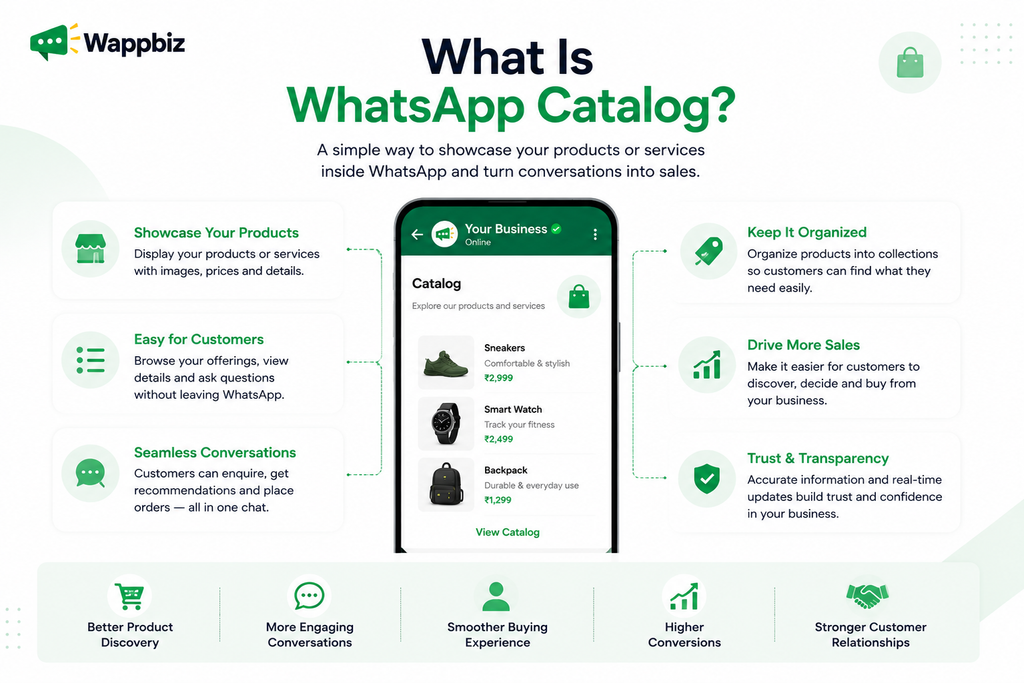
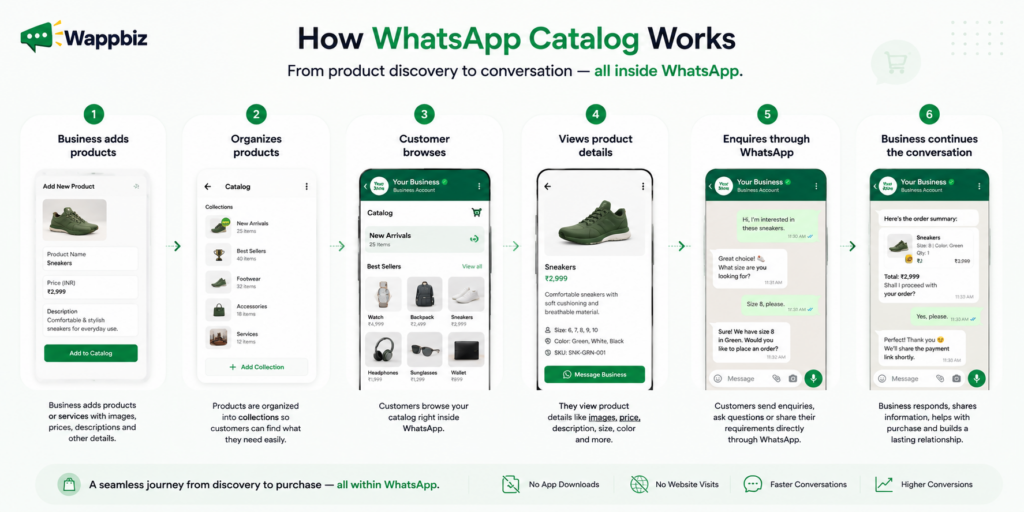
A WhatsApp Catalog is a digital storefront that allows businesses to showcase products or services through WhatsApp in a structured, easy-to-browse format. Instead of repeatedly sending individual product images, prices, descriptions, or service information during every conversation, businesses can organize their offerings into a catalog that customers can explore.
For a customer, this means product discovery becomes part of the WhatsApp experience. For a business, it means fewer repetitive product-sharing conversations and a more organized way to present products and services.
How Does a WhatsApp Catalog Work?
A WhatsApp Catalog works like a digital storefront inside WhatsApp, allowing customers to discover products or services while staying connected with the business through chat. Businesses add their offerings with images, prices, descriptions, and relevant details, then organize them into collections to make browsing easier.
When customers find something they are interested in, they can enquire about the product and continue the conversation directly on WhatsApp. This creates a smoother journey from product discovery to customer enquiry and purchase intent, without requiring businesses to manually send product information every time.
Consider a customer looking for furniture. Without a catalog, the customer may message:
“Can you send me your available sofas?”
An agent then has to find relevant images, send prices, explain specifications, and potentially repeat the same process for several products. With a WhatsApp Catalog, customers can browse available options first and then start a more specific conversation around the products they are actually interested in.
Instead of: “What products do you have?”
the conversation can become: “I’m interested in this sofa. Is it available in another colour?”
This allows product discovery to happen before the detailed sales conversation begins.
Why Should Businesses Use a WhatsApp Catalog?
A WhatsApp Catalog does not have to function only as a traditional ecommerce product listing. Businesses can use it to organize and showcase both products and services. The goal remains the same: give customers a structured way to understand available options before or during the conversation. The objective isn’t to add as much information as possible. It is to provide enough information for customers to make their next decision.
The real value of a WhatsApp Catalog is not simply displaying products. It is reducing the friction between product discovery and customer conversation.
1. Showcase Products and Services Directly on WhatsApp
Businesses can present product details, pricing, descriptions, images, and service offerings through a structured WhatsApp experience. Customers don’t have to depend entirely on an agent sending products manually. This is especially useful for businesses where WhatsApp is already an important sales or enquiry channel.
2. Create a More Frictionless Product Discovery Experience
Every additional step in a customer journey creates an opportunity for the customer to leave.
Sending someone from: WhatsApp → Website → Product Page → Form → WhatsApp
Can create unnecessary movement between channels.
A catalog allows more of the initial discovery experience to happen where the conversation is already taking place. Customers can browse available options and then continue discussing the product through WhatsApp.
3. Convert Conversations Into Purchase Opportunities
WhatsApp conversations frequently begin with broad questions.
“What do you have?” , “Can you share your latest collection?” , “What options are available?”
A catalog gives the business an opportunity to move the customer from a general enquiry toward specific product interest. Once the customer identifies an item, the sales conversation becomes much more focused.
Discovery → Product Interest → Enquiry → Sales Conversation → Purchase Opportunity
4. Reduce Repetitive Product Sharing
Sales representatives often spend time repeatedly sending:
- Product images
- Prices
- Specifications
- Service information
- Product links
A structured catalog gives teams a reusable product-discovery resource. Instead of rebuilding the same product presentation for every customer, agents can focus on questions that actually require human assistance.
5. Make Product Discovery More Accessible
Customers already use WhatsApp for everyday communication. Providing product information through a familiar channel reduces the need for customers to learn a new interface or navigate an unfamiliar journey just to understand what a business offers.
For mobile-first customers in particular, this can make the discovery experience more natural.
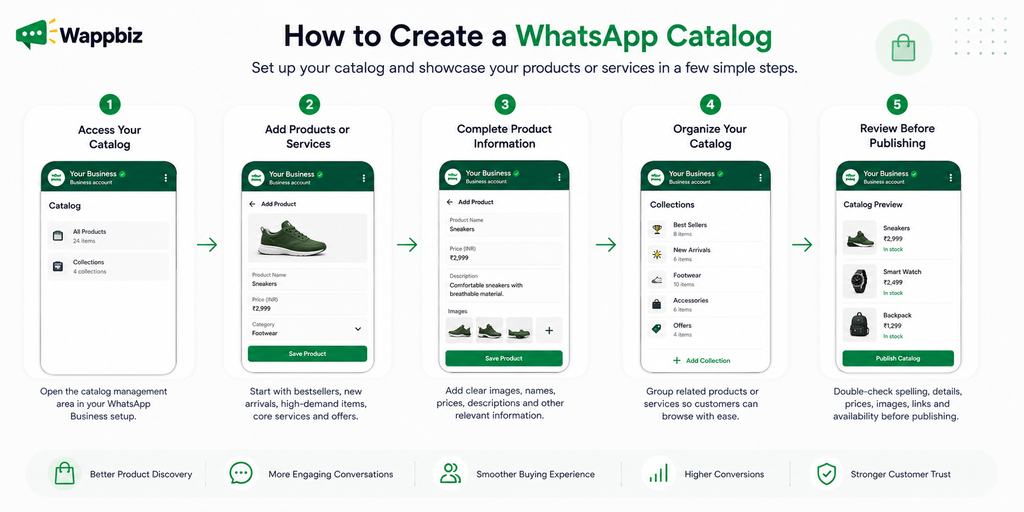
How to Create a WhatsApp Catalog
Step 1: Access Your Catalog
Open the relevant catalog management area associated with your WhatsApp Business setup.
Step 2: Add Products or Services
Begin with products customers most frequently ask about, such as:
- Bestsellers
- New arrivals
- High-demand products
- Core services
- Current promotions
Step 3: Complete the Product Information
Add clear images, product names, pricing where appropriate, descriptions, and other relevant information.
Step 4: Organize Your Catalog
Group related offerings so customers can browse logically instead of navigating one long list.
Step 5: Review Before Publishing
Check:
- Spelling
- Product information
- Prices
- Image quality
- Links
- Availability
The catalog represents your business during the product-discovery stage, so inaccurate information can create unnecessary friction later.
WhatsApp Catalog Best Practices
Creating the catalog is only the first step. Maintaining its quality determines how useful it remains. Use Clear, Consistent Product Images. Avoid mixing high-quality photography with blurry screenshots or inconsistent product visuals. The catalog should feel like one connected storefront.
Write Descriptions Around Customer Questions
Don’t write: “Premium-quality product available now.”
Explain what customers actually need to know.
For example: “Lightweight cotton shirt designed for everyday wear, available in sizes S–XL and three colours.”
Keep Prices and Availability Updated
Customers shouldn’t browse a product, become interested, and then discover that the displayed price is outdated or the item has been unavailable for weeks.
Keep Collections Simple
Too many overlapping collections can make discovery harder rather than easier. Every collection should have a clear purpose.
Make Popular Products Easy to Find
Consider prominently organizing:
- Bestsellers
- New Arrivals
- Recommended Products
- Seasonal Products
- Current Offers
Review the Catalog Regularly
Catalog maintenance should become part of normal marketing and sales operations.
Review images, prices, descriptions, availability, links, and collections periodically.
How to Turn WhatsApp Catalog Browsing Into Customer Engagement
This is where the catalog becomes more strategically valuable. Displaying products is useful, but businesses ultimately need customers to take action. WappBiz enables businesses to connect product and service catalogues with broader WhatsApp customer journeys.
Share Relevant Products During Conversations
When a customer asks about a particular requirement, teams can share relevant catalog products rather than sending unrelated options.
The interaction becomes more contextual:
Customer need → Relevant product → Product enquiry → Sales conversation
Run Targeted Catalog-Based WhatsApp Campaigns
Businesses can promote relevant products or catalogues through WhatsApp broadcast campaigns to appropriate customer segments.
Segmentation could be based on factors such as:
- Customer interests
- Previous interactions
- Purchase history
- Product preferences
- Customer lifecycle stage
For example, customers who previously purchased skincare products may receive a campaign featuring a relevant new collection rather than an unrelated product range.
The objective is not simply to send more catalog links. It is to make catalog discovery more relevant to the recipient.
Connect Click-to-WhatsApp Ads With Catalog Discovery
Meta ads can introduce customers to a product or offer and bring them directly into a WhatsApp conversation. The journey can then continue:
Facebook/Instagram Ad → WhatsApp Conversation → Relevant Catalog → Product Enquiry → Sales Follow-Up
This helps maintain continuity between the product that attracted the customer’s attention and the conversation that follows.
Managing WhatsApp Catalog Enquiries at Scale
As catalog-driven conversations increase, businesses face a different challenge. How do you manage all the enquiries that product discovery generates? A growing business may have:
- Multiple sales representatives
- Hundreds of customer conversations
- Different product categories
- Repeat customers
- Follow-up requirements
- Leads at different buying stages
At this point, simply having a catalog is not enough. Businesses need to connect product interest with conversation management. With WappBiz, catalog-driven conversations can be managed from a centralized workspace, helping teams maintain visibility into customer enquiries, conversations, and follow-up activity. Instead of product discovery operating separately from sales operations, the two can become part of one customer journey.
Connect WhatsApp Catalog With Lead Qualification and Automation
Product discovery should not become disconnected from what happens after a customer decides to buy. Once a customer identifies a product, businesses may need to manage:
- Customer details
- Product selection
- Quantity
- Order information
- Payment or purchase steps
- Sales ownership
- Customer communication
- Follow-ups
Connecting product discovery with customer communication and order handling creates a more continuous journey within the WhatsApp ecosystem. The goal is to reduce unnecessary breaks between: “I like this product” and “I want to buy this product.”
How WappBiz Extends the WhatsApp Catalog Experience
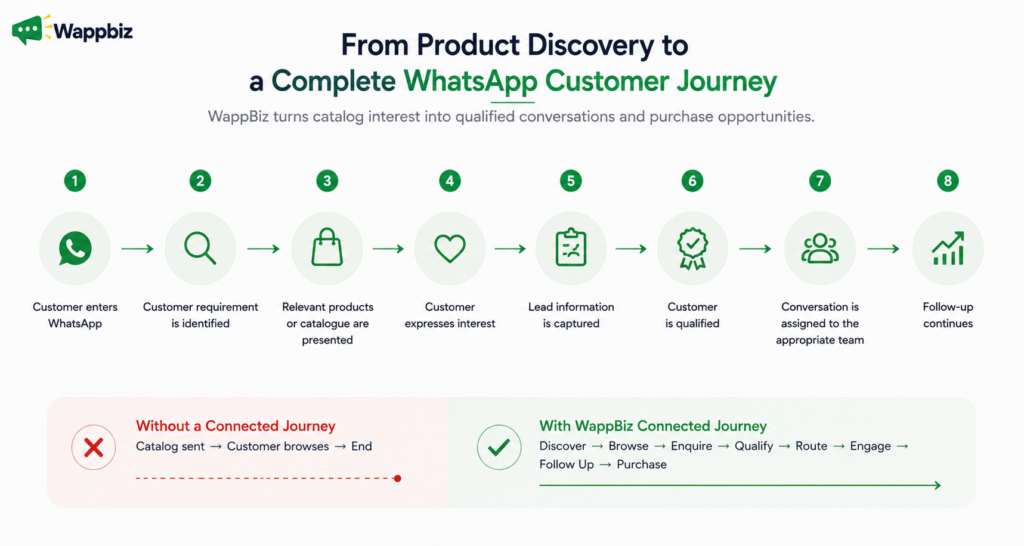
A WhatsApp Catalog makes product discovery easier, but browsing a product is only the beginning of the customer journey. Once customers find something they are interested in, businesses still need to understand their requirements, answer questions, capture buying intent, manage the conversation, follow up, and move the customer closer to a purchase.
WappBiz extends the WhatsApp Catalog experience by connecting product discovery with the wider customer journey. Instead of treating the catalog as a standalone product showcase, businesses can connect catalog interactions with campaigns, customer conversations, automation, lead qualification, team workflows, follow-ups, and order management.
Showcase Products and Services Inside WhatsApp
Businesses can present products, services, packages, and other offerings through WhatsApp Catalog experiences, giving customers a structured way to discover what is available. Rather than requiring sales teams to repeatedly send individual images, prices, descriptions, and product details, customers can browse relevant offerings and then continue the conversation around what interests them.
This helps move conversations from broad questions such as “What products do you have?” toward more valuable enquiries such as “I’m interested in this product. Can you tell me more about it?”
Turn Catalogs Into Targeted Customer Campaigns
A catalog becomes more valuable when businesses can proactively bring relevant products to the right customers. WappBiz allows catalogues and products to become part of targeted WhatsApp campaigns, helping businesses reach appropriate customer segments based on available interests, behaviour, previous interactions, or purchase history.
For example, an ecommerce brand can introduce a new collection to customers who have previously shown interest in that category instead of sending the same promotion to its entire audience. This connects customer segmentation with product discovery and creates a more relevant path from campaign to conversation.
Capture Product Interest as an Actionable Enquiry
When someone browses a catalog and asks about a particular product, that interaction represents customer intent. For businesses handling a large number of WhatsApp conversations, these signals need to be captured and managed rather than becoming another message inside an overcrowded inbox.
WappBiz helps bring catalog-generated conversations into a centralized workspace, where teams can continue the customer interaction with greater visibility. The product enquiry can therefore progress naturally from initial interest to requirement discussion, recommendation, follow-up, and ultimately a purchase decision.
Understand Customer Requirements With Automation
A customer expressing interest in a product does not always need to be immediately transferred to a salesperson. In many cases, the business first needs to understand what the customer actually wants.
WappBiz can connect catalog discovery with chatbots and automated WhatsApp workflows that collect relevant customer information during the conversation. A real estate customer, for example, could be asked about preferred location, configuration, budget, and purchase timeline before the conversation reaches a sales representative. An ecommerce customer could similarly be guided according to product preference, requirement, or category.
This creates more context around the enquiry and helps the business understand the customer’s needs before human involvement.
Qualify Catalog Enquiries Before Sales Follow-Up
Not every customer browsing a WhatsApp Catalog has the same level of purchase intent. One customer may simply be exploring products, while another may have selected a specific product, shared their requirements, and indicated that they are ready to purchase.
By connecting catalog interactions with customer data capture and qualification workflows, businesses can better understand which conversations require immediate sales attention. This makes the WhatsApp Catalog part of the lead qualification process rather than simply a digital product display.
Route Conversations to the Right Team
Once the customer’s requirement has been identified, WappBiz can help move the conversation to the appropriate team or agent. A bridal jewellery enquiry, for example, can be directed toward the relevant sales team, while a product support question can be handled by customer support.
This becomes particularly important for businesses with multiple product categories, departments, locations, or sales representatives. Clear conversation ownership helps reduce unnecessary transfers and makes it easier for the customer to reach someone capable of handling their specific requirement.
Manage Catalog Conversations From One Workspace
As WhatsApp becomes an important sales channel, catalog enquiries may arrive alongside conversations generated through campaigns, Click-to-WhatsApp Ads, chatbots, websites, and existing customers.
WappBiz provides a centralized environment for managing these conversations so teams have better visibility into customer interactions and ownership. This helps maintain continuity when multiple team members are involved and reduces the risk of valuable catalog enquiries being overlooked or losing context during handovers.
Continue the Journey With Customer Follow-Ups
Customers do not always purchase immediately after discovering a product. Someone may browse a catalog today, enquire about an item, compare alternatives, and make a decision several days later.
WappBiz allows businesses to continue the engagement through structured follow-up journeys instead of allowing initial product interest to disappear. Depending on the customer journey, businesses can reconnect around relevant products, reminders, new collections, or other appropriate communication and keep the conversation moving toward the next action.
This transforms the catalog from a one-time browsing experience into part of a longer customer engagement journey.
Connect Product Discovery With Order Management
The experience should also remain connected once a customer decides to purchase. Product selection may need to be followed by customer information, quantities, variants, delivery requirements, order details, and further communication.
By connecting product discovery with customer conversations and order handling, WappBiz helps reduce the disconnect between “I like this product” and “I want to buy this product.” The catalog becomes an entry point into a broader commerce workflow rather than the final destination.
From Product Discovery to a Complete WhatsApp Customer Journey
The real value of extending a WhatsApp Catalog is therefore not simply displaying more products. It is creating continuity after customers discover something they want. A basic catalog experience can end after the customer browses. A connected experience can continue from discovery to browsing, enquiry, intent capture, qualification, routing, engagement, follow-up, and purchase.
For retail, ecommerce, D2C, and service businesses, this turns the WhatsApp Catalog into an active part of customer acquisition and conversion. Customers get a convenient way to discover products, while businesses gain a structured way to manage what happens after that discovery.
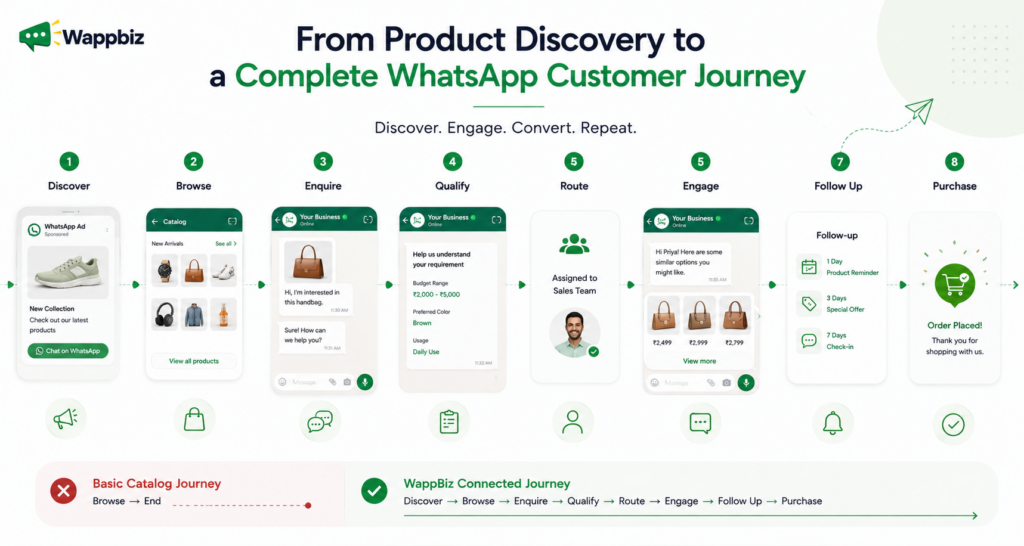
The question therefore moves beyond “How can we showcase products on WhatsApp?” to “How can we turn WhatsApp Catalog interest into qualified customer conversations and purchase opportunities?” That is where WappBiz extends the WhatsApp Catalog from a storefront into a connected customer journey.
Turn Your WhatsApp Catalog Into a Complete Customer Journey
A WhatsApp Catalog can do much more than replace manually sending product images. It can give customers a structured way to discover products and services through a channel they already use, while helping businesses turn product interest into meaningful customer conversations.
The opportunity becomes even greater when catalog discovery is connected with campaigns, chatbots, lead qualification, team management, follow-ups, and order workflows. Instead of thinking about the catalog as the final destination, think of it as the beginning of the journey:
Showcase → Discover → Enquire → Engage → Convert → Follow Up
With WappBiz, businesses can connect these stages and build a more seamless WhatsApp commerce experience, from the first product interaction to the conversations that move customers closer to purchase. Go beyond simply showcasing products. Connect product discovery with customer conversations, automation, follow-ups, and purchase journeys, all within WhatsApp. Get Started with Wappbiz Now!