



























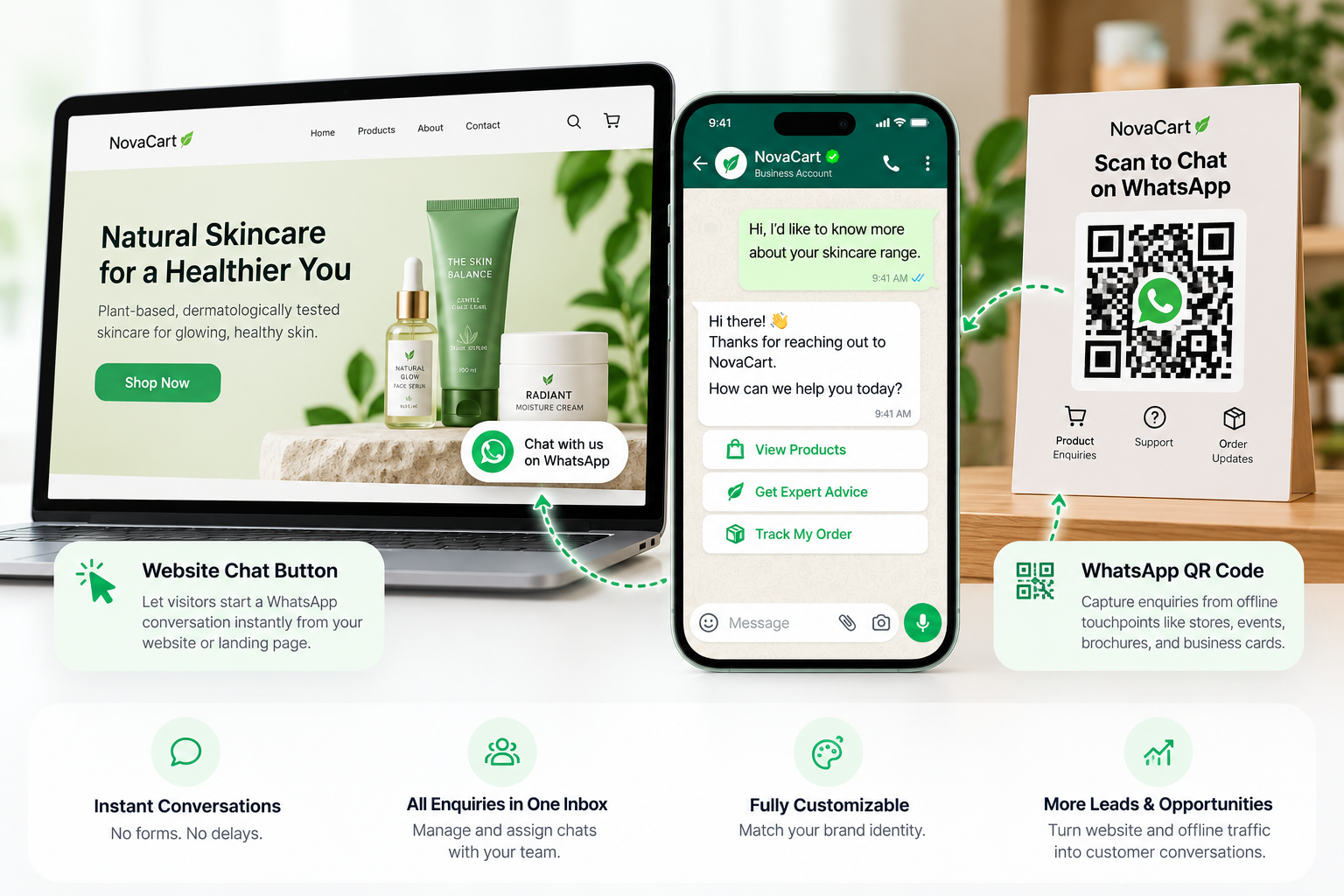
Turn Website Visitors into Conversations
WhatsApp Chat Button & QR Code

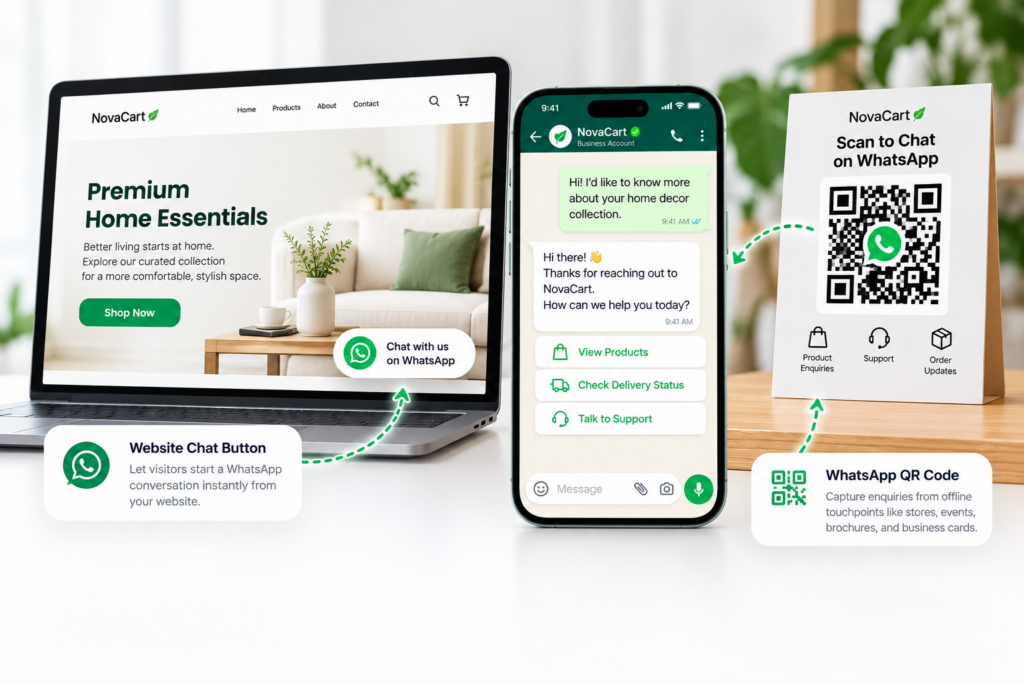
Make it easier for customers to connect with your business through a customizable WhatsApp chat button and scannable QR codes. Capture enquiries from websites, landing pages, stores, and offline campaigns.

WhatsApp Commerce Hero Showcase

Join over 500+ customers worldwide who trust Wappbiz!

lok8
casio
mmc-2
mdoc
tmss Logo
dreamworks
lilliput
royal Diamonds Logo
qqspere
paranoid Logo
keystaffer logo
shibaam Computer Logo
palm-springs
chalkwalk
IBT INFRACON Logo
sprytech Logo
Image gallery marquee
WhatsApp QR Code

What Is a WhatsApp Chat Button & QR Code?

A WhatsApp Chat Button allows website visitors to start a conversation with your business directly from a website or landing page.

A WhatsApp QR Code provides a scannable entry point that customers can use to open a WhatsApp conversation from printed materials, physical locations, and other offline touchpoints.

Connect with Customers Through WhatsApp Buttons & QR Codes

whatsapp_chat_settings_icon

One-Click WhatsApp Chat Button

Let website visitors initiate WhatsApp conversations without manually saving your business number.

brand_customization_icon

Customizable WhatsApp Chat Widget

Match your website's WhatsApp chat widget to your brand identity for a consistent customer experience.

whatsapp_qr_code_icon

Downloadable WhatsApp QR Codes

Connect offline customer interactions with WhatsApp using scannable QR codes.

shared_inbox_icon

Centralized WhatsApp Team Inbox

Manage conversations initiated through website buttons and QR codes within WappBiz.

WHATSAPP CHAT BUTTON AND QR CODE

Why Businesses Need WhatsApp Chat Buttons & QR Codes

01

Simplify Customer Communication

Allow customers to start WhatsApp conversations directly from websites or QR codes.

02

Reduce Contact Friction

Offer a convenient alternative to lengthy contact forms and manual contact searches.

03

Capture More Enquiry Opportunities

Turn interested website visitors and offline audiences into direct customer conversations.

04

Maintain Brand Consistency

Customize your WhatsApp chat widget with brand colors, logos, and business details.

05

Personalized Communication

Tailor follow-ups and customer engagement based on contact profiles and segmentation.

06

Manage Enquiries in One Place

Bring incoming WhatsApp conversations into a shared workspace for team collaboration.

Make Every Click and Scan a Conversation

Connect with customers through customizable WhatsApp chat buttons and QR codes, and manage incoming enquiries with WappBiz.

How Different Industries Use WhatsApp Buttons & QR Codes

From real estate and retail to healthcare and education, WhatsApp buttons and QR codes help businesses make customer communication more accessible across digital and physical touchpoints.

Real Estate

Add WhatsApp buttons to property listings and QR codes to brochures or site signage for buyer enquiries.

Healthcare

Let patients initiate appointment enquiries through website buttons or QR codes at reception desks.

Travel agencies

Group travellers by destination preferences, travel dates, and enquiry status.

Educational Institute

Add WhatsApp contact options to admission pages and QR codes to prospectuses or event banners.

E-commerce

Enable product enquiries through website chat buttons and QR codes on packaging or store displays.

Travel

Help travellers enquire about packages through landing pages, brochures, and promotional materials.

Seamless Integrations for Enhanced Efficiency

Seamlessly integrate with your preferred apps to streamline workflows and ensure business continuity. With Wappbiz, simplify your processes and enhance efficiency across every aspect of your business, enabling smooth communication and data flow between all your essential tools.

airtable logo
Google Calendar logo
google-contacts
google-sheet-1
zapier
pabbly
shopify
wordpress
woocomerce
razorpay-logo
calendly
deepseek logo
openai logo
airtable logo
Google Calendar logo
google-contacts
google-sheet-1
zapier
google forms
pabbly
shopify
wordpress
woocomerce
razorpay-logo
marketing-agency

Frequently Asked Questions

A WhatsApp chat button is a clickable website element that opens a conversation with a business on WhatsApp, allowing visitors to send enquiries without manually searching for contact details.


With WappBiz, you can categorize contacts using custom tags and apply filters based on attributes such as pipeline stage, active tags, and recent chat activity to create relevant customer segments.

Create and configure your WhatsApp chat widget in WappBiz, customize its appearance, and add it to your website using the supported installation method.

Yes. WappBiz supports customization of the chat widget’s colors, business logo, and display name to match your brand identity.

A WhatsApp QR code contains a link that opens a business conversation when scanned with a compatible smartphone. Customers can then send a message directly through WhatsApp.

Businesses can place WhatsApp QR codes on brochures, business cards, posters, product packaging, store displays, event banners, and other printed or digital materials.