
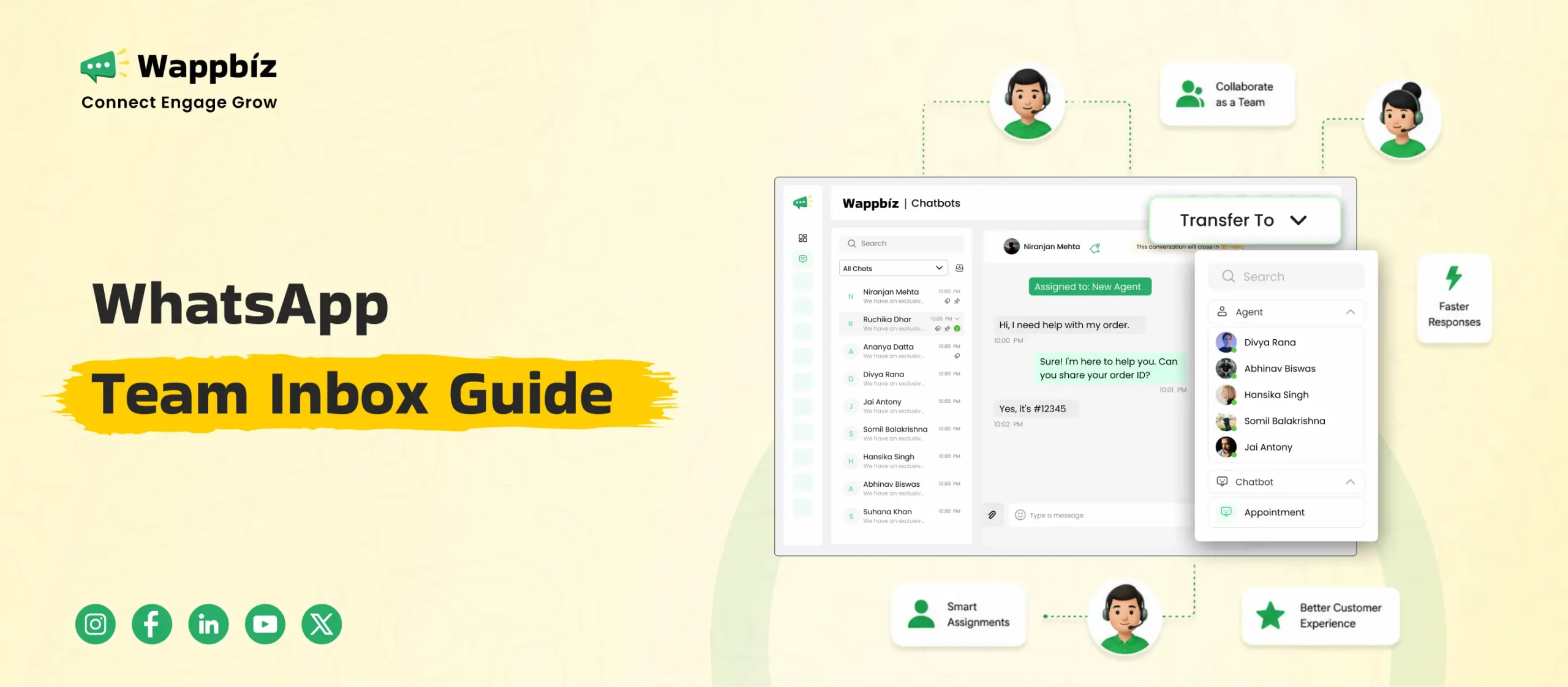
Managing customer communication on a single phone works when your business is small. A few messages come in, someone replies, and everything feels controlled. But as your business scales, managing a high volume of conversations on the standard app quickly becomes chaotic. Messages arrive too fast, multiple team members need access, and one person replies while another is already typing. This creates missed follow-ups, slow response times, and inconsistent customer experiences. To solve these bottleneck issues, modern companies are upgrading to a dedicated WhatsApp team inbox. This guide covers how a professional shared workspace helps your business centralize customer chats, automate manual sales and support workflows, and scale your operations without operational complexity.
What is a WhatsApp Team Inbox?
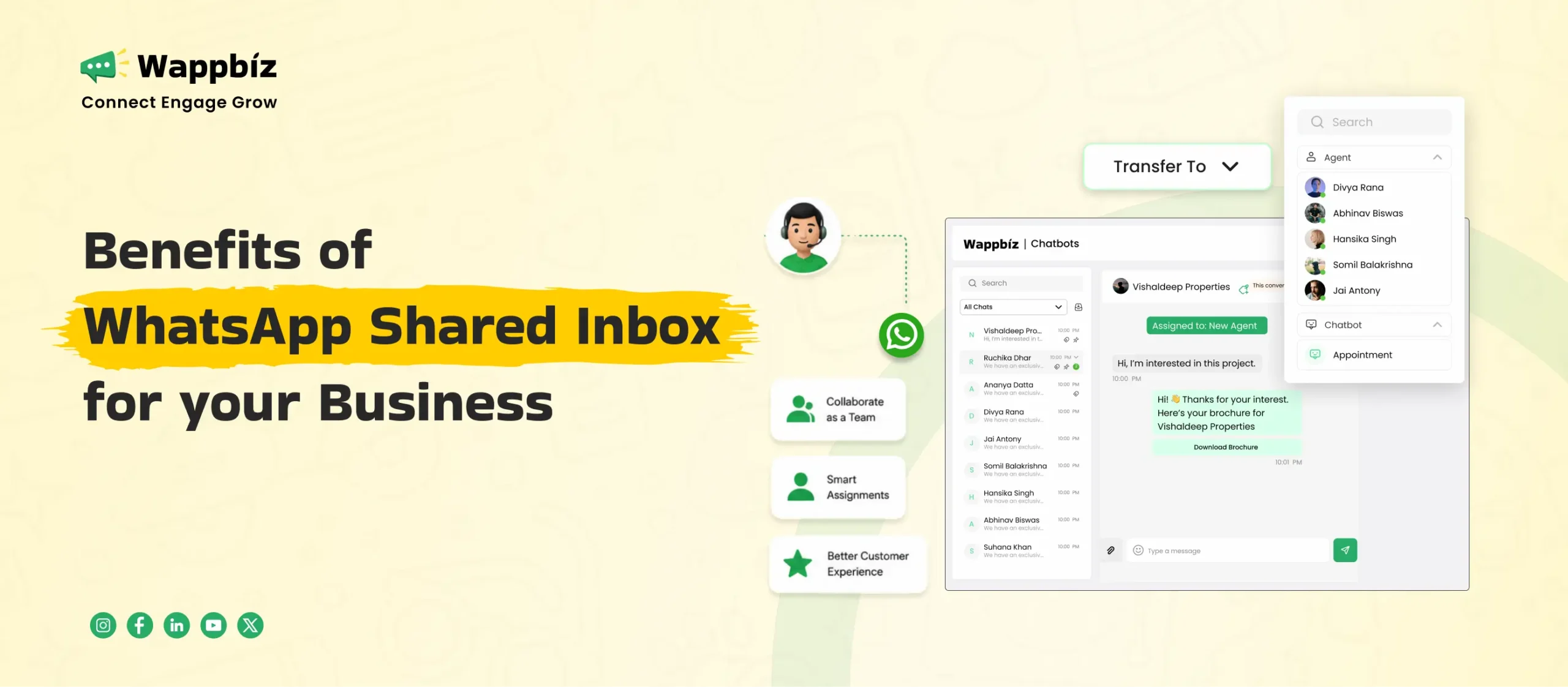
A WhatsApp team inbox is a centralized, digital dashboard that allows multiple team members to view, manage, and respond to customer messages simultaneously from one single phone number. Instead of relying on individual mobile devices or sharing separate corporate SIM cards, your entire team handles incoming conversations from an organized web platform or mobile application. It serves as a shared workspace designed specifically to help growing businesses manage high message volumes without manual confusion or message collision.
How Does It Actually Work?
The entire operation relies on the official WhatsApp Business API, which connects your business number directly to a cloud-based server infrastructure rather than a single physical phone. Here is the exact step-by-step breakdown of how data flows through the system:
- Instant Server Syncing: When a customer sends a message to your business number, Meta servers instantly route that data to your team inbox platform via the secure cloud API.
- Centralized Distribution: The message immediately lands in a unified, multi-agent login dashboard where every connected agent can see it in real time.
- Real-Time Workspace Updates: The moment an agent claims a chat, changes a label, or types a response, the cloud server syncs that specific action across every single active computer screen in your office, preventing duplicate replies.
- Live Performance Tracking: As agents handle conversations, the system automatically logs background data such as individual response times, total chat resolution times, and daily conversation volumes. This metadata updates your analytics dashboard instantly, giving managers complete operational visibility into team productivity without needing to check individual agent screens.
Why Do Businesses Need a WhatsApp Team Inbox?
As customer inquiries shift away from email and phone calls, managing a growing brand on standard consumer messaging apps becomes highly inefficient. Growing teams face immediate structural limitations that slow down response times and impact general operations.
Four Linked Device Limit
The free WhatsApp Business application restricts your workspace by allowing a maximum of only four linked web devices at the same time. The moment your business hires a fifth sales or support representative, your team hits a hard operational bottleneck where agents must constantly log out to let others handle customer chats. A professional team inbox removes this barrier entirely, allowing an unlimited number of live agents to access the exact same business number from separate computers.
Missed Customer Messages and Leads
When multiple agents try to manage a high volume of inbound inquiries from a single shared mobile phone or a few linked web screens, conversations inevitably fall through the cracks. There is no system to track which representative is handling which prospect, leading to cases where high-intent sales inquiries are left completely unanswered or forgotten. This structural chaos causes slow responses, which directly drives down your overall customer conversion rates
Account Security Threats and Weaknesses
Forcing an entire department to share a single physical smartphone or split identical login credentials creates severe data vulnerabilities. Managers lose all personal accountability because it is impossible to track which specific individual sent a message or deleted a customer record. Furthermore, broadcasting account credentials across a large team increases the risk of unauthorized data exports, exposing your private customer database to potential security leaks.
Key Features of a Professional WhatsApp Business Team Inbox
A dedicated workspace transforms how your business interacts with customers by replacing basic text messaging with advanced operational tools. These specialized capabilities allow your business to manage thousands of incoming chats efficiently. Some of the key features are:
Automated Chat Routing Rules
Instead of forcing your staff to scroll through a chaotic list and manually choose their own conversations, a professional inbox distributes customer queries automatically. The platform utilizes smart distribution rules like round-robin routing to assign incoming messages fairly among active team members. This ensures clear chat ownership, prevents agents from picking only the easiest queries, and dramatically lowers customer wait times.
Collaborative Private Internal Notes
When an agent needs assistance from a supervisor or a technical specialist to resolve a complex problem, they do not need to switch to external chat tools or walk over to another desk. The shared inbox allows team members to leave private internal comments directly inside the customer conversation timeline. These notes remain completely invisible to the customer, allowing your internal departments to coordinate seamlessly behind the scenes.
Instant Automated Quick Replies
To eliminate the friction of typing out repetitive responses to frequent customer questions, the team inbox lets you store standardized templates. Agents can instantly search and pull up pre-approved answers for common queries like business hours, delivery timelines, or refund policies. This maintains a consistent brand voice across all departments and allows agents to resolve inquiries with a single click.
Secure Customer Number Masking
Protecting your corporate database is critical when expanding your sales and support operations. A premium team inbox includes a built-in number masking feature that automatically hides the personal phone numbers of your customers from live support agents. Staff can read messages, reply to inquiries, and handle orders perfectly, but they cannot view, copy, or export the actual contact details. This critical feature prevents data misuse, protects your valuable lead database, and ensures complete customer privacy.
To learn more about optimizing your dashboard setup you can also read our comprehensive Key Features to Look for in a WhatsApp Team Inbox structural guide.
Benefits of Using a WhatsApp Team Inbox
Upgrading your customer communication channel to a shared digital workspace delivers immediate operational improvements across your entire organization. Moving away from manual processes allows you to scale your communication infrastructure smoothly while enhancing your overall customer experience strategy.
Faster Customer Response Times
By utilizing a centralized dashboard and automatic chat routing, your agents can respond to inbound queries within seconds instead of hours. Team members can claim, process, and resolve active tickets seamlessly, ensuring that no customer is left waiting in a long queue. This rapid speed of resolution greatly satisfies modern users, who expect immediate answers when messaging a brand.
Zero Missed Marketing Leads
When you run promotional broadcasts or paid click-to-WhatsApp ad campaigns, inquiries often arrive in massive waves. A team inbox captures every single incoming connection automatically and saves it within a structured database. Because every conversation has a clear owner and a visible status label, your sales pipeline remains completely secure, and zero high-intent prospects fall through the cracks.
Complete Manager Operational Visibility
Business owners and support supervisors gain an all-in-one view of the entire communication department. The built-in analytics dashboard tracks critical business metrics like individual agent response times, daily chat volumes, and campaign engagement levels in real time. This complete operational transparency eliminates assumptions, allowing managers to optimize staff workloads and identify training gaps immediately.
Seamless Business Tool Integrations
A professional team inbox connects directly with your existing technology stack, linking your WhatsApp conversation data to your CRM system, e-commerce storefront, or accounting platforms. This deep integration ensures that customer data flows smoothly between tools without human intervention. Agents no longer waste time copying text between platforms, and they receive full customer purchase histories right next to the active chat screen.
Lower Workforce Operational Costs
Automating your customer communication framework allows your existing team to handle significantly larger conversation volumes without expanding your payroll. Features like instant quick replies and basic automation manage routine FAQs automatically, freeing up your staff to focus only on high-value sales opportunities. This drastic reduction in repetitive manual work means your business can scale its sales and support operations easily without adding heavy administrative overhead.
Roles, Permissions, and Granular Access Controls
Managing customer conversations at scale requires a structured operational hierarchy combined with flexible security controls. A shared WhatsApp team inbox built on the official API utilizes a role-based access control (RBAC) system where each predefined role comes equipped with a default set of system permissions. Recognizing that every business operates differently, advanced setups complement these base roles with Page Access Control toggles. Instead of enforcing a rigid, one-size-fits-all approach, administrators can use these toggles to dynamically enable or disable specific pages, tailoring platform access to perfectly match their unique organizational workflows.
Predefined Platform Roles
- Admin
- Scope of Control: Comprehensive platform and system oversight.
- Key Permissions: Full administrative command. Admins manage global configurations, system settings, user onboarding, and core billing structures. They possess absolute visibility across all workspaces and features.
2. Manager
- Scope of Control: High-level operational and strategy management.
- Key Permissions: Managers oversee broader functional setups and cross-team workflows. They analyze deep operational metrics, build or modify chatbot architectures, oversee messaging lists, and adjust assignment patterns across multiple lines of business.
3. Team Lead
- Scope of Control: Supervisorial, department-level oversight.
- Key Permissions: Team Leads track active conversation loops, supervise agent workloads, and monitor real-time team KPIs. Functioning as active supervisors, Team Leads possess the specific authority to evaluate the ticket queue and directly assign or reallocate chats to individual agents to maintain SLA times.
4. Team Member
- Scope of Control: Direct customer engagement and operational execution.
- Key Permissions: Team Members function as the primary handling agents. They interface with assigned customers, reply to inbound tickets, process service workflows, and update ongoing contact logs.
Granular Custom Configuration via Toggles
Beyond assigning one of the four base roles, systems feature precise toggle-based overrides. This ensures granular access control across various structural modules, guaranteeing long-term security and functional alignment as platform capabilities evolve:
- Core Operational Interfaces: Independent toggles govern access to the Dashboard (metric overview), live Chats interface, Customers (profiles/data), and administrative Manage settings.
- Automation & Architecture: Access can be restricted or granted for configuring the automated Chatbot, adjusting conversational Tags and Sub Tags, designing multi-channel Forms, and deploying user-facing WhatsApp Buttons.
- Marketing & Product Logistics: Toggles manage visibility for building All Campaigns, editing approved message Templates, creating interactive Catalog, and coordinating targeted Meta Ads (Facebook/Instagram tracking).
- Data Pipelines & Commerce: Security permissions control who can view and extract financial or demographic records across Orders, specific Leads categories, Form Responses, Analytics, and specialized Template Analytics.
Use Cases of WhatsApp Team Inbox
A shared team inbox transforms a single official business number into a cross-departmental hub. By unlocking multi-agent accessibility, organizations can optimize workflows across critical operational verticals.
1. Dynamic Customer Support Ecosystem
- The Challenge: Handling multi-tier technical queries and incoming service requests over a single business number without dropping tickets.
- The Solution: A team inbox distributes high-volume queries systematically. Frontline Team Members use canned quick-responses for immediate answers, while complex tickets are flagged or seamlessly routed upwards. Features like internal private comments let agents loop in senior support directly inside the live chat window without exposing internal discussions to the client.
2. Conversational Sales and Pipeline Velocity
- The Challenge: Seamlessly distributing hot marketing leads to appropriate sales experts and updating deal stages instantly.
- The Solution: Inbound interest is instantly processed and captured. Sales reps can reference complete, historical context from past touchpoints to construct highly personalized pitches. They can update lead qualification criteria, process customized checkout parameters directly in the chat, and sync information smoothly across core company databases.
3. Integrated Logistics and Order Fulfillment
- The Challenge: Resolving shipping bottlenecks, delivery disputes, and return processing by connecting separate back-office workflows.
- The Solution: Frontline agents flag post-purchase issues, transferring the relevant chat thread directly to logistics or fulfillment specialists. Teams can instantly confirm delivery photography, update live return statuses, verify real-time inventory levels, and check order histories directly beside the messaging panel.
Intelligently Setting Up a WhatsApp Team Inbox
Configuring a shared inbox requires connecting the Meta API structure with a system built to intelligently manage data distribution, customer experience flags, and agent queues.
Step 1: Initialize the Official API Connection
Because consumer apps are strictly limited in simultaneous device logins, scaling a business requires official API provisioning.
- Provision an authorized, clean phone number (it must be entirely disconnected from any standard personal or business WhatsApp apps).
- Set up your platform environment and tie it into your Meta Business Suite infrastructure to activate your API messaging channel.
Step 2: Establish Hierarchy and Custom Toggles
Structure your internal framework to control data access and match organizational departments.
- Onboard your personnel and assign them to one of the four foundational roles: Admin, Manager, Team Lead, or Team Member.
- Use the granular Page Access Control toggles to activate or deactivate specific system modules (like Analytics, Chatbot settings, or Orders data) based on individual user responsibilities.
Step 3: Implement Advanced Inbound Chat Routing & Allocation
Determine exactly how incoming messages are handled the moment a conversation begins using advanced distribution logic:
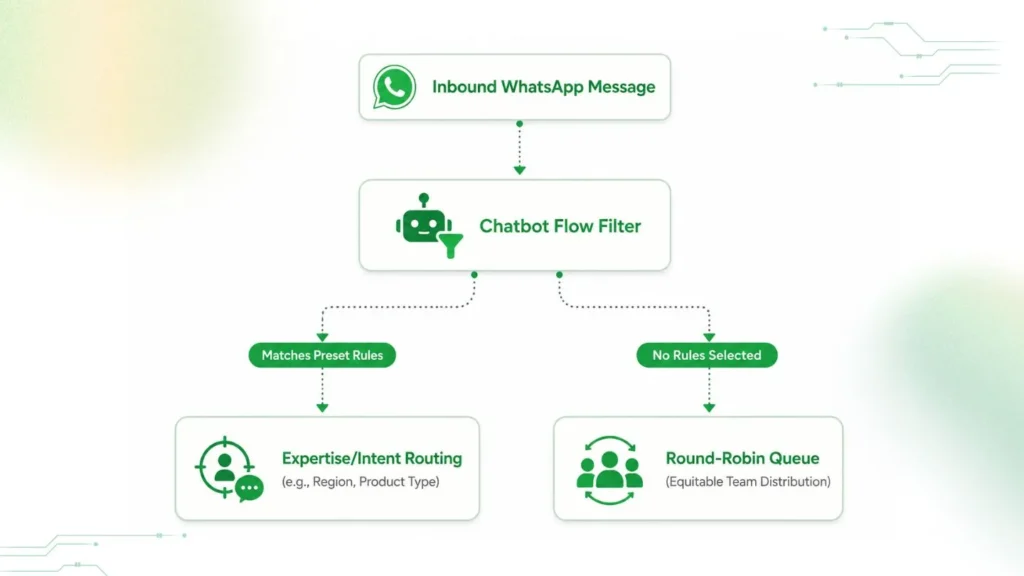
- Automated Round-Robin Queues: When enabled for active Team Members, the platform equitably and automatically balances incoming workloads among available agents to maintain fast response times.
- Intent and Expertise Chatbot Flows: Instead of broad distribution, your chatbot flow can be designed to gather initial context (e.g., asking for language, geographic region, or product type via interactive menus). Based on the customer’s selection, the chat is automatically routed directly to specific teams with that precise expertise.
- Manual Lead Delegation: For highly sensitive or unstructured workflows, Team Leads can monitor unassigned inbound pools and manually delegate chats to optimal agents.
Step 4: Configure Experience Flags & Tech Integrations
Maximize operational control by defining customer-facing parameters and ecosystem connections.
- Chat Transfer Visibility: Customize the front-end user experience by toggling whether customers can explicitly see when their chat is being transferred across agents or departments, matching your brand’s communication style.
- CRM and System Syncing: Establish API webhooks connecting your team inbox to central CRMs or ERPs. This ensures that every time a status changes, a contact tag is applied, or an order is updated in the chat window, data updates instantly across your enterprise system of record.
For a complete structural breakdown of the setup steps and platform options, read our detailed How to Manage Multiple Agents on One WhatsApp Number optimization guide.
Best Practices for Managing a WhatsApp Team Inbox
Deploying the technical architecture is only the first step. To maintain a highly efficient customer communication workflow, your operational leaders must establish structured daily management protocols.
Smart Conversation Tagging Systems
As hundreds of chats stream into your workspace, organizing them with live visual labels prevents internal team confusion. Agents should apply distinct status tags such as New Lead, Payment Pending, or Escalated Support to every active thread. This categorization allows your sales and support representatives to sort through a massive dashboard instantly, focus heavily on high-intent customer segments, and locate historical conversations without scrolling manually.
Strict Response Service Level Agreements
To keep your brand reputation strong, your management team must set clear conversation speed targets, often called Service Level Agreements. For example, you can mandate that all incoming sales queries receive an initial agent response within 5 minutes, while complex support tickets must be resolved within 2 hours. Setting these firm internal deadlines keeps your customer-facing staff highly accountable and prevents long customer wait times.
Regular Agent Performance Audits
Managers and team leads must leverage the platform’s built-in analytics dashboard to review team productivity metrics every week. By monitoring data points like individual chat resolution numbers, average wait times, and customer satisfaction scores, supervisors can easily spot bottlenecks. These regular operational reviews help leaders optimize daily agent schedules, identify training needs, and ensure consistent brand communication across all shifts.
Common Mistakes to Avoid
Even with a professional workspace in place, poor strategic habits can lower team efficiency and frustrate your customers. Avoiding these three common pitfalls keeps your communication workflows running smoothly.
Manual Chat Picking Friction
Allowing support staff or sales representatives to scroll through an open queue and manually select which customer chats they want to answer creates immediate operational issues. This lack of structure leads to internal friction, as agents often pick only the easiest, low-effort inquiries while leaving complex or difficult customer problems unaddressed for hours. To maintain consistent service, businesses should use automatic routing rules like round-robin distribution to assign incoming chats fairly and automatically.
Overloaded Automated Bot Spam
While setting up automated greeting messages and multi-step chatbot loops helps save time, over-automating your communication channels quickly damages your user experience. Forcing a high-intent buyer to navigate through endlessly repetitive menus without providing a clear, immediate way to speak with a human agent creates immense customer frustration. Automation should handle routine FAQs smoothly, but the system must always offer a fast option to connect with a live team member for complex or sensitive inquiries.
Outdated Internal Team Knowledge Bases
If your internal team knowledge bases, standardized template responses, and pre-approved quick replies are outdated, your agents will inevitably provide conflicting or incorrect information to your customers. Giving frontline staff the freedom to guess answers to questions about shifting corporate policies, active pricing discounts, or current refund timelines leads to highly inconsistent brand messaging. Managers must review, update, and sync all saved canned responses across the entire workspace regularly to ensure your team delivers accurate answers.
Why Choose Wappbiz for WhatsApp Team Inbox
Selecting the right platform infrastructure is the final, critical step to successfully optimizing your conversational marketing and support strategies. Wappbiz provides a premium, official partner workspace that ensures your communication channels remain stable, highly secure, and optimized for maximum business conversion.
Meta-Verified Official API Infrastructure
Operating your shared workspace on Wappbiz’s verified, official Meta business infrastructure provides your brand with direct cloud stability. This technical backing prevents sudden account suspension risks and ensures that your message delivery metrics remain consistently high, even during massive marketing or promotional broadcast campaigns.
High-Intent Marketing Frameworks Integration
The Wappbiz team inbox allows you to seamlessly align your customer journeys with advanced content and conversion frameworks, such as the AIDA (Attention, Interest, Desire, Action) model. By structuring your inbound conversational paths to guide users smoothly from initial attention to a specific call to action, your team can naturally convert cold inquiries into active sales.
Complete Regional Compliance and Security
Our communication dashboard is engineered to meet strict regional business standards across multiple markets, including India, the UAE, and the USA. Features like secure customer number masking and detailed role-based access control ensure that your internal database complies perfectly with local data privacy laws while keeping your operations fast and agile.
Dedicated 24/7 Technical Onboarding Support
Moving your business operations over to the official WhatsApp Cloud API requires precise setup, from cleaning up your existing number to submitting documents for Meta Business verification. Wappbiz offers a dedicated onboarding team that guides you step-by-step through the migration process, ensuring zero downtime for your active customer communication channels.
Conclusion
Upgrading to the Wappbiz shared team workspace replaces the daily chaos of fragmented consumer applications with a centralized, secure, and highly scalable customer experience engine. By establishing clear user roles from Admin to Team member and implementing automated routing rules, your business can significantly reduce customer wait times, protect your valuable lead database, and unlock complete operational visibility.
As your brand scales its messaging strategy across regions, utilizing our structured, multi-agent dashboard ensures that your teams can handle thousands of concurrent conversations seamlessly, turning a simple chat application into your most powerful channel for revenue growth and long-term customer loyalty.
Don’t let slow responses and unassigned chats cost you another high-value lead. Experience the power of full team collaboration, secure number masking, and seamless automation firsthand.
Sign up today and get a 7-Day Free Trial!
Take control of your customer conversations, boost your team’s productivity, and watch your conversion rates soar completely risk-free. Your customers are waiting; reply to them faster with Wappbiz.
FAQ
Can multiple users use one WhatsApp number?
Yes, with a Wappbiz WhatsApp Team Inbox multiple agents can access and manage a single WhatsApp number simultaneously.
Does it require WhatsApp Business API?
Yes, multi-agent features require a connection to the official WhatsApp Business Cloud API.
Can I integrate WhatsApp team inbox with my CRM?
Yes, the team inbox integrates directly with your existing CRM, e-commerce storefronts, or accounting platforms to sync customer data automatically.
Can we restrict specific team members from exporting customer data within the inbox?
Yes, the platform features strict role-based access controls that allow admins to restrict Team Members from viewing or exporting customer data.
Are managers able to silently monitor live agent conversations before intervening?
Yes, the system provides real-time monitoring dashboards and private internal notes, allowing managers and team leads to oversee live chats silently before stepping in.
Can multiple team members reply to the same customer?
Yes, multiple authorized agents can view and respond to the same conversation window, making it easy to hand off or escalate chats seamlessly.
How can a manager track all WhatsApp customer conversations without manual forwarding?
Managers and admins have complete, central visibility over the entire shared team inbox, allowing them to monitor all live chats from a single dashboard in real time.
How do I know which team member is handling each customer conversation?
The dashboard automatically displays clear ownership tags, status labels, and a visible interaction history, showing exactly who is managing each open ticket.